hide-disable-remove-blogger navbar from your blog

Learn how to hide,disable or remove the blogger navbar(navigation bar) from your blog.
First,let us see what blogger navbar is:


blogger navbar

Blogger navbar allows users to easily navigate to other random blogs and it also has a feauture to search the blogs ,and mark any blog as spam.
So,now you have a clear idea of what really a blogger navbar is.So, why so many people prefer to just remove the navbar inspite of the feautures it has like search,etc.Many people think that, it spoils the look of the blog,especially if your blog has differnet subtitle layout which looks too obvious to see for a visitor.Well, let me come to the actual point on how to disable or hide your blogger navbar.

Below is the step-by-step procedure on how to do it with photos to make it easy to understand.

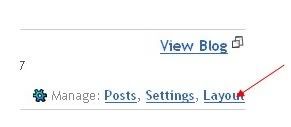
1.Sign in to your blogger account and click the layout button next to your blog name

click the layout button

2.Next,click the edit html tab as shown in the below picture.


edit html

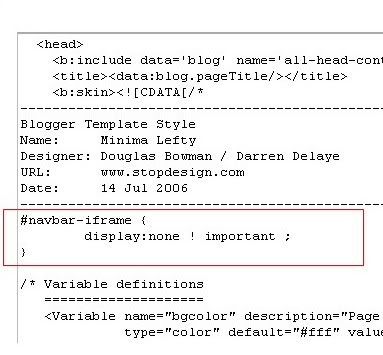
3.Add the below html code as specified in the below picture.
#navbar {
      height: 0px;
      visibility: hidden;
      display: none;
}


add the code like this

4. Save the changes.

Now, you can see your blog without that navbar(this tip can only hides the navbar,it doesn't completely delete it).If you want the navbar to appear again,just remove that code and save the changes.

How to Enable Right Click in Websites

You are probably sometimes tried to save images or copy the contents of the website that forbid their use of the right-click. Most websites use javascript to prohibit the use of the right-click , so to enable it you should disable the javascript.
There are many ways to do ti , the simplest by my opinion is using Web Developer 1.1.9 , firefox add-on .
1) Downlaod Web Developer 1.1.9 from this link
2) Click Disable button
3) Select Disable Javascript
4) Again select “All Javascript” option.

Top 5 Windows 7 Hacks

There are plenty of hidden features in Windows 7. We have compiled top 5 windows 7 hacks that are not only completely safe but also are easy to perform.
Here are the top 5 windows 7 hacks:

Enabling Aero User Interface

Aero is a very cool and beautiful user interface of Windows 7. To run Aero, you need a PC with specs like 1 GHz CPU, 1 GB system memory and 128MB of video RAM. If your system is low on specs, you won’t be able to use Aero. Here is a workaround for enabling Aero on systems that have low specs.
1. Launch Windows Registry Editor by typing Regedit in Start Menu
2. Navigate to HKEY_CURRENT_USER\Software\Microsoft\Windows\DWM
3. Right-click on the right-hand pane and create the following three DWORD entries and set value for each one:
Animations – set value to 0.
Blur – set value to 0.
UseMachineCheck – set value to 0.
4. Close the Registry Editor
5. Go to the Start Menu, enter “cmd” and press Enter to open the Command Prompt.
6. Type the following commands:
Net Stop uxsms and then press Enter
Net Start uxsms and then press Enter
7. The last step is to right-click on your desktop and choose: Personalize/Windows Colors.

Windows 7 GodMode

The Windows GodMode features lets you view all the control panels in a single folder. All you need to do is create a new folder by the following name: GodMode.{ED7BA470-8E54-465E-825C-99712043E01C}. After it is done, the icon of the folder will change to the control panel icon and when you open the folder, you will see all the control panel options inside it.

Fix Taskbar Preview Delay Time

Windows 7 users know that thumbnail preview of taskbar items is a very cool feature. You can view the thumbnail by hovering the mouse over the respective taskbar item. However, you may notice that sometimes, the previews do not appear quickly. Here is a hack to fix the taskbar preview delay time.
1. Launch Windows Registry Editor by typing regedit in Start Menu
2. Navigate to HKEY_CURRENT_USER\Software\Microsoft\Windows\CurrentVersion\Explorer\Advanced
3. Right click in the right-hand pane of Windows Registry and select New -> DWORD Value.
4. You need to name the new DWORD as “ExtendedUIHoverTime
5. Double-click on the created DWORD to open it.
6. Select “Decimal” under “Base” and enter the delay time (in milliseconds) in the “Value data” field.
7. Click OK

Putting a New Windows 7 Login Screen

If you do not like the Windows 7 login screen, you can change it by trying this simple hack. Here is how you can do it.
1. Launch the Windows Registry Editor by typing Regedit in Start Menu
2. Go to‘HKEY_LOCAL_MACHINE\Software\Microsoft\Windows\CurrentVersion\Authentication\LogonUI\Background‘.
3. Double-click the DWORD value called ‘OEM Background’ to open it and enter 1 in the Value data field.
Note: If the DWORD ‘OEM Background’ is not there, you need to make it.
4. Browse to the background image that you would like use on the log-in screen. A JPEG file that is less than 245 kb in size can only be used here.
5. Copy the image you want to use into the ‘%windir%\system32\oobe\info\backgrounds‘ folder. If the folder is not present, you need to create it.
6. Rename the image to backgroundDefault.jpg
7. Restart your computer to check the new login background screen.

Enabling Quick Launch

Quick Launch is a place where you can add set of icons that you frequently use. This feature can be found in Windows XP and Windows Vista, however it is not present on Windows 7. You can enable it by doing the following hack:
1. Right click on the taskbar and then select New Toolbar.
2. You need to put the following location %userprofile%\AppData\Roaming\Microsoft\Internet Explorer\Quick Launch in the new window that appears.
3. Next, click on ‘Select Folder’.
4. Quick Launch will appear on the taskbar but will contain text of the respective icon. To hide it, click on the dotted lines and uncheck ‘Show Title’ and ‘Show Text’

Blogger Hacks

Here you will find great blogger hacks  which are useful to bloggers using the Blogger platform. Enjoy!

Expandable Posts or Read More Hack

Here is classic way of expanding posts which takes the reader to the post page upon clicking “Read more” link.
1) Login to blogger dashboard and go to Layout->Edit Html
2) Find  </head >and add this code before it
<pre>
&lt;b:if cond=’data:blog.pageType != “item”‘&gt;
&lt;script type=”text/javascript”&gt;
var fade = false;
function showFull(id) {
var post = document.getElementById(id);
var spans = post.getElementsByTagName(’span’);
for (var i = 0; i &amp;lt; spans.length; i++) {
if (spans[i].id == “fullpost”) {
if (fade) {
spans[i].style.background = peekaboo_bgcolor;
Effect.Appear(spans[i]);
} else spans[i].style.display = ‘inline’;
}
if (spans[i].id == “showlink”)
spans[i].style.display = ‘none’;
if (spans[i].id == “hidelink”)
spans[i].style.display = ‘inline’;
}
}
function hideFull(id) {
var post = document.getElementById(id);
var spans = post.getElementsByTagName(’span’);
for (var i = 0; i &amp;lt; spans.length; i++) {
if (spans[i].id == “fullpost”) {
if (fade) {
spans[i].style.background = peekaboo_bgcolor;
Effect.Fade(spans[i]);
} else spans[i].style.display = ‘none’;
}
if (spans[i].id == “showlink”)
spans[i].style.display = ‘inline’;
if (spans[i].id == “hidelink”)
spans[i].style.display = ‘none’;
}
post.scrollIntoView(true);
}
function checkFull(id) {
var post = document.getElementById(id);
var spans = post.getElementsByTagName(’span’);
var found = 0;
for (var i = 0; i &amp;lt; spans.length; i++) {
if (spans[i].id == “fullpost”) {
spans[i].style.display = ‘none’;
found = 1;
}
if ((spans[i].id == “showlink”) &amp;amp;&amp;amp; (found == 0))
spans[i].style.display = ‘none’;
}
}
&lt;/script&gt;
&lt;/b:if&gt;
</pre>
3) Find this div for the post-body and add the portion of code in red color.

<div class='post-body'  expr:id='"post-" + data:post.id' >

     <b:if cond='data:blog.pageType == "item"'>
        <style>#fullpost{display:inline;}</style>
        <p><data:post.body/></p>
     <b:else/>
        <style>#fullpost{display:none;}</style>

        <p><data:post.body/></p>

       <span id='showlink'>
        <a expr:href='data:post.url'>Read More......</a>
       </span>
       <script type='text/javascript'>
         checkFull("post-" + "<data:post.id/>");
       </script>
     </b:if>

     <div style='clear: both;'/> <!-- clear for photos floats -->
   </div>

4)Go to Settings->Formatting-> Post Template
In Post Template copy/paste these lines and save settings
Type your summary here
<span id=”fullpost”>
Type rest of the post here
</span>
5)If you create new post you will see area where you should type summary and where to type rest of post

Remove NavBar in Blogger


If you one of these who hate blogger navbar , you came to the right place , here I will show you how to remove it.
1) Login to blogger dashboard and go to Layout->Edit Html
2)Add the following CSS   anywhere in your template between the <style> tags.
#navbar-iframe
{
height:0px; visibility:hidden; display:none;
}

How to create a locked folder in Win XP

To create a locked folder we need to create two batch files. The first batchfile will “lock” the folder (actually it will turn the ordinary folder into a link to the Control Panel using an address code), and the other one  will “unlock” it. When someone tries to access that folder, he will be redirect to Control Panel(we can in fact type in any address code so that the user could be redirected to wherever we want). You should hide these batch files, especially the second one.
1. Create a folder, that you will use to store your protected data. For this example, I created a folder called “locked”, and put that folder in My Documents.
create a locked folder
2. Open Notepad and copy this code ren “FOLDERNAME” FOLDERNAME.{21EC2020-3AEA-1069-A2DD-08002B30309D}
“FOLDERNAME” change in to name of your folder, in this example “FOLDERNAME” is locked.My code looks like this ren locked.{21EC2020-3AEA-1069-A2DD-08002B30309D} locked
Save notepad file like lock.bat in My Documents. In option Save as Type, select All Files
create a locked folder
3. Open another notepad file and copy this code ren FOLDERNAME.{21EC2020-3AEA-1069-A2DD-08002B30309D} “FOLDERNAME” , Save file as in Step 2, just choose a different filename , like unlock.bat
After this we can see in My Documents something like this:create a locked folder
If we open (double click) lock.bat our folder will turn into a link to Control Panel, and the files will not be visible. until we use unlock.bat
create a locked folder
Here is video guide

Facebook Blaster Pro 7.1.6

Facebook Blaster Pro 7.1.6
Facebook Blaster Pro 7.1.6 | 1.79 MB
Facebook has become the hottest thing since MySpace and YouTube. In fact many are migrating over to Facebook because MySpace has become SpamSpace.
250 Million Members
Mass Facebook Amber Alerts
Mass Facebook Friend Requests
Mass Facebook Friend Messages
Mass Facebook Friend Pokes
Mass Facebook Wall Poster
100% CAPTCHA Bypass*
System Requirements: Microsoft.Net Framework 2.0
Home Page -
YouTube Friend Adder - Free MySpace Bot Facebook Friend Adder Bot Software at StealthFriendBomber.com


hide ip Privacy

images/stories/app/product1/screenshots/screenshot.jpg

Open Hide IP Privacy

images/stories/app/product1/screenshots/screenshot-1.jpg

Hide IP Address

images/stories/app/product1/screenshots/screenshot-2.jpg

Select Fake Location

images/stories/app/product1/screenshots/screenshot-3.jpg

Options - General

images/stories/app/product1/screenshots/screenshot-4.jpg

Options - Browser

DOWNLOAD + PATCH

Google new search index: Caffeine

Google new search index: Caffeine
Today, we're announcing the completion of a new web indexing system called Caffeine. Caffeine provides 50 percent fresher results for web searches than our last index, and it's the largest collection of web content we've offered. Whether it's a news story, a blog or a forum post, you can now find links to relevant content much sooner after it is published than was possible ever before.

Some background for those of you who don't build search engines for a living like us: when you search Google, you're not searching the live web. Instead you're searching Google's index of the web which, like the list in the back of a book, helps you pinpoint exactly the information you need. (Here's a good explanation of how it all works.)

So why did we build a new search indexing system? Content on the web is blossoming. It's growing not just in size and numbers but with the advent of video, images, news and real-time updates, the average webpage is richer and more complex. In addition, people's expectations for search are higher than they used to be. Searchers want to find the latest relevant content and publishers expect to be found the instant they publish.

To keep up with the evolution of the web and to meet rising user expectations, we've built Caffeine. The image below illustrates how our old indexing system worked compared to Caffeine:

Google new search index: Caffeine


Our old index had several layers, some of which were refreshed at a faster rate than others; the main layer would update every couple of weeks. To refresh a layer of the old index, we would analyze the entire web, which meant there was a significant delay between when we found a page and made it available to you.

With Caffeine, we analyze the web in small portions and update our search index on a continuous basis, globally. As we find new pages, or new information on existing pages, we can add these straight to the index. That means you can find fresher information than ever before—no matter when or where it was published.

Caffeine lets us index web pages on an enormous scale. In fact, every second Caffeine processes hundreds of thousands of pages in parallel. If this were a pile of paper it would grow three miles taller every second. Caffeine takes up nearly 100 million gigabytes of storage in one database and adds new information at a rate of hundreds of thousands of gigabytes per day. You would need 625,000 of the largest iPods to store that much information; if these were stacked end-to-end they would go for more than 40 miles.

We've built Caffeine with the future in mind. Not only is it fresher, it's a robust foundation that makes it possible for us to build an even faster and comprehensive search engine that scales with the growth of information online, and delivers even more relevant search results to you. So stay tuned, and look for more improvements in the months to come.

50 Traffic Strategies for your site

YOU SHOULD CHOOSE 5 OF THE BELOW STRATEGIES WHICH YOU FIND THE EASIEST TO IMPLEMENT AND WORK ON THEM FOR 5 DAYS (1 DAY EACH). THEN CHOOSE THE NEXT 5 AND IMPLEMENT.
IMPLEMENTATION IS THE KEY HERE, WORK UNTIL YOU HAVE EXECUTED ATLEAST 30 OF THE STRATEGIES AND YOU WILL HAVE QUALITY TRAFFIC FOR A LONG TIME. love love


1. Trade an adequate amount of Stumbles to improve your site’s Stumble Ranking. StumbleUpon is a feasible option, where-in better the content, higher the hits. Also, Diggs can be utilised to get your site indexed quickly.

2. Backlinks can be substantially incremented through sites such as Propeller, OnlyWire and SocialMarker, which serve the purpose of improving indexing and rankings.

3. A suitable press release publicizing your site can be submitted directly to PRWeb.com to attain a good flow of traffic and even rankings.

4. If a competitor with high traffic-site uses Ad Sense, then you can use Google’s Site Targeting Program to get your ad directly to your competitor’s site, evading hassles of contacting the owner.

5. Advertise your site with certified and commonly visited classifieds such as the centralized network on CraigsList.org.

6. Posting quality content through constant offerings on groups, communities and forums with common interests will help attract a good amount of traffic.
7. LinkedIn.com has a widespread online business social networking forum which effectively helps increase your contacts and repo amongst other online marketers.

8. It is essential to keep updating and modifying your site in order to make it seem more dynamic. This will attract more visits from popular search engines.

9. Publishing brochures or even a mini-book based on what your site is all about can assist in creating huge publicity spreads.

10. Posting regularly on your blog and then pinging each time you write in is of great help. Also, each post must contain apt keywords concerned with the business in order to initiate better search results.

11. Writing eye-grabbing reviews about products that belong to the same niche as yours on blogs in your own niche with a link back to your site.

12. Helpful suggestions or comments can be left on other people’s blogs, with a backlink to your site attached at the bottom.

13. Options such as social bookmarking, Refer to a Friend and other such viral techniques will enable a widespread of your site’s popularity.

14. Sites such as OnlyWire.com help in automating social book marking, which enables you to generate more backlinks automatically, thus resulting in traffic from affiliated sites.

15. Offering free items on your site, such as free courses, affiliate products or e-books will help gain a higher number of subscribers and repeat traffic.

16. Attaining membership to the Better Business Bureau will not only help you develop marketing skills, but also enable you to have your site’s link posted on their website.


17. Submitting articles with qualitative contents to popular article directories and blogs and forums.

18. Business cards are also an effective method to create contacts and expand networks.

19. At times, you can get to advertise your site on the Thank You and Reference pages of other Sales websites in return of a nominal charge for the site owner.

20. Personal profiles on popular social networking sites such as Facebook, MySpace and Twitter can prove heavily beneficial to circulate your site’s information and backlinks.

21. A video-clip containing informative footage regarding your site can be uploaded on common video hosting sites such as YouTube. The link to your site must be included primarily in the About Video/Information section of the clip.

22. Buying advertisements on EBay or using PPC techniques is a way of spending your way into luring customers.

23. Some local Radio stations often accept advertisements at relatively affordable costs. So, investing some amount in advertisements on Radios in another medium of mass-communication with a large reach.

24. Also, sponsoring a small segment on a local News channel is a viable long-term option to spread word about your site.

25. Niches impact traffic flows heavily. Picking the correct niches to venture into and combining them with properly researched keywords thus becomes important for long term traffic.

26. If the content is able to generate enough heat, encouraging people to subscribe to your RSS feeds will become easy, which is an efficient method of building a loyal base of visitors.

27. Many readers who use backlinks to reach your site may not necessarily enter your index page. Hence, each standalone page of the site must be intriguing and attractive enough to make them navigate further and read on.

28. Multiple blogs can be created with one parent site to backlink to. Since all of these blogs act as channels leading to the same parent site, continuous traffic inflow is ensured.


29. Giving out attractive bloggers’ awards or rewarding the best blog entries in cash or kind can prove to be a healthy way of attracting a constant inflow of bloggers.

30. Posting backlinks on websites in similar niches and higher Page-Rank will assist in getting your site’s ranking up. Higher the Page-Rank, better the rankings on Search Engines.

31. If you use Yahoo, then it is a common trick to set up a feed on MyYahoo. This will help Yahoo keep automated track of the updates on your site and blogs.

32. Web campaigns either earn money or cost money. Thus, it becomes vital to keep track of your site’s campaigns from time to time through effective tests of their feasibility.

33. An effective offline strategy, which is slightly expensive and lesser known, involves bringing forth your advertisements in front of the common public via modes such as posters, t-shirts, publishing in magazines etc.

34. Also, public places such as alleys, bus stations, cafes etc. are apt sites where you can put up paper Stick-Ons to promote your URL amongst the common masses.

35. The Alexa Tool Bar is an efficient tool to monitor traffic reports and acquire traffic rankings after searching profitable niche keywords on search engines like Google.

36. Hosting Tele-seminars or Webinars with other marketers of your niche can prove to be critical tools in enlightening members of your network with information about your site.
37. If you can’t get famous, get infamous. A trick to attract more eyes is to generate a controversial idea, against the popular beliefs common in the market, and then spread it around through articles and e-books.

38. There could be sites with misspellings or variations of your domain name floating on the web. Try and purchase some space on them in order to forward your URL.

39. Buying an authoritative site and getting high powered people to use it adds to your reputation. Following that up with a few press releases helps attain publicity.

40. Every time you make a presentation to a club, forum or local society, it is highly advisable to mention your site as many times as possible and expand your contacts amongst other online marketers.

41. Write articles and submit to E-zine articles and build backlinks to them if necessary(for quick google rankings), link back to your main page.

42. Use twitter to direct traffic, use automation software to add followers.

43. Add valuable articles to forums in your niche and have a link in your signature.

44. Write guest posts on high traffic blogs in your niche. Do a domain whois search for getting the details of the owner or write a comment telling that you have an offer that can be of mutual benefit.

45. Build a list and send them quality information once a week, soon you can have them come to your site just by requesting.

46. Build relationships in your niche. With fellow webmasters and more importantly the traffic. Make lists and satisfy them with good information.

47. Make video files watermarked with your URL and upload to torrent sites and other sharing hubs (mediafire,rapidshare). Give links to these download pages in forums.

48. Make linkwheels and keep at it consistently.

49. Ping, social bookmark and submit your RSS feeds to rss feed aggregators to get a steady source of traffic each time you update your site.

50. GET TO WORK AND STOP DAY DREAMING.

Windows 7's Secret | 'GodMode'

Although its name suggests perhaps even grander capabilities, Windows enthusiasts are excited over the discovery of a hidden "GodMode" feature that lets users access all of the operating system's control panels from within a single folder.

By creating a new folder in Windows 7 and renaming it with a certain text string at the end, users are able to have a single place to do everything from changing the look of the mouse pointer to making a new hard-drive partition.

The trick is also said to work in Windows Vista, although some are warning that although it works fine in 32-bit versions of Vista, it can cause 64-bit versions of that operating system to crash.

To enter "GodMode," one need only create a new folder and then rename the folder to the following:


GodMode.

{ED7BA470-8E54-465E-825C-99712043E01C}


Once that is done, the folder's icon will change to resemble a control panel and will contain dozens of control options. I'm not sure it's my idea of playing God, but it is a handy way to get to all kinds of controls.

Enjoy.... wink